The day book for solo pet groomers
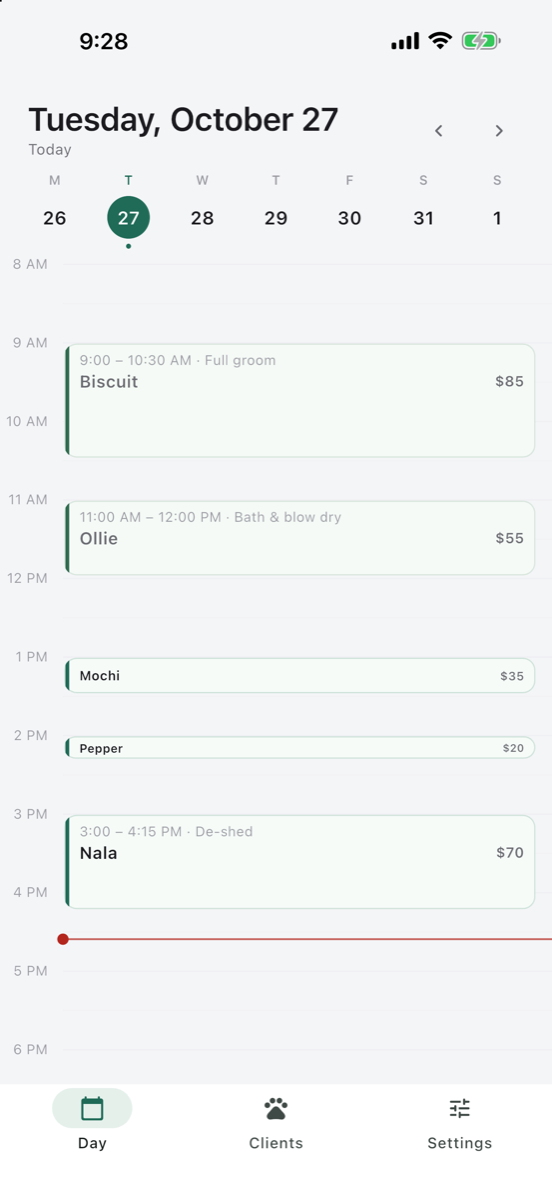
The paper appointment book you keep in your head — on the iPad on your table. Open it and today is already there: every dog, every time, every service, every price, in one column you can read from across the room.
Free to download · No account · No subscription · Works offline
Why groomers leave it open all day
Not a list you scroll. A column you glance at with clippers in your hand.
Whole day at a glance
Every dog, time, service and price on one screen. No pagination, no scrolling to find out what's next.
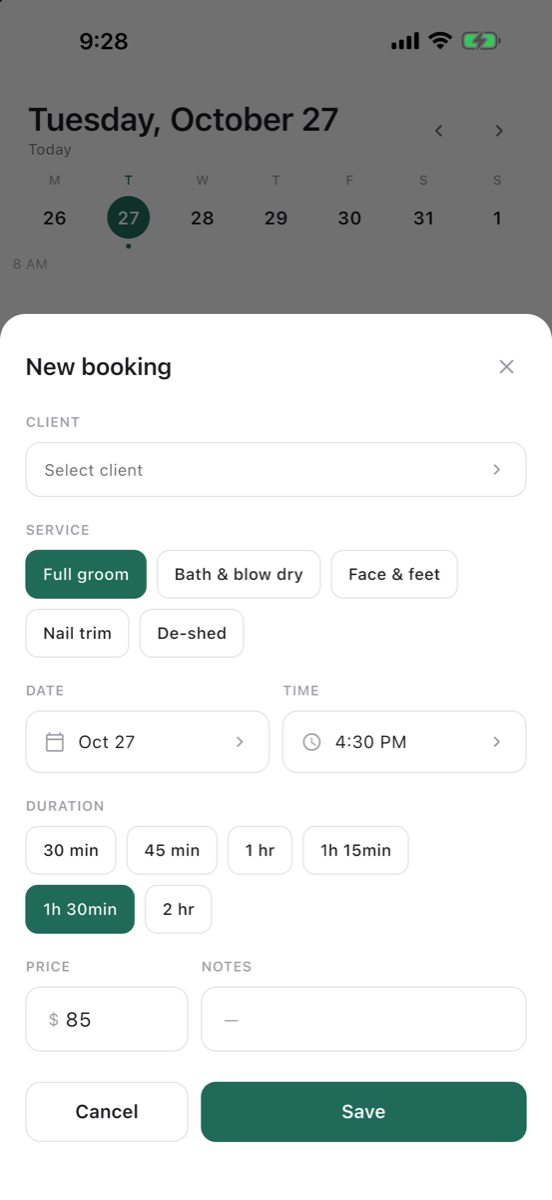
Tap an empty slot to book
15-minute snapping. Pick the dog, pick the service, done — without leaving the day you're looking at.
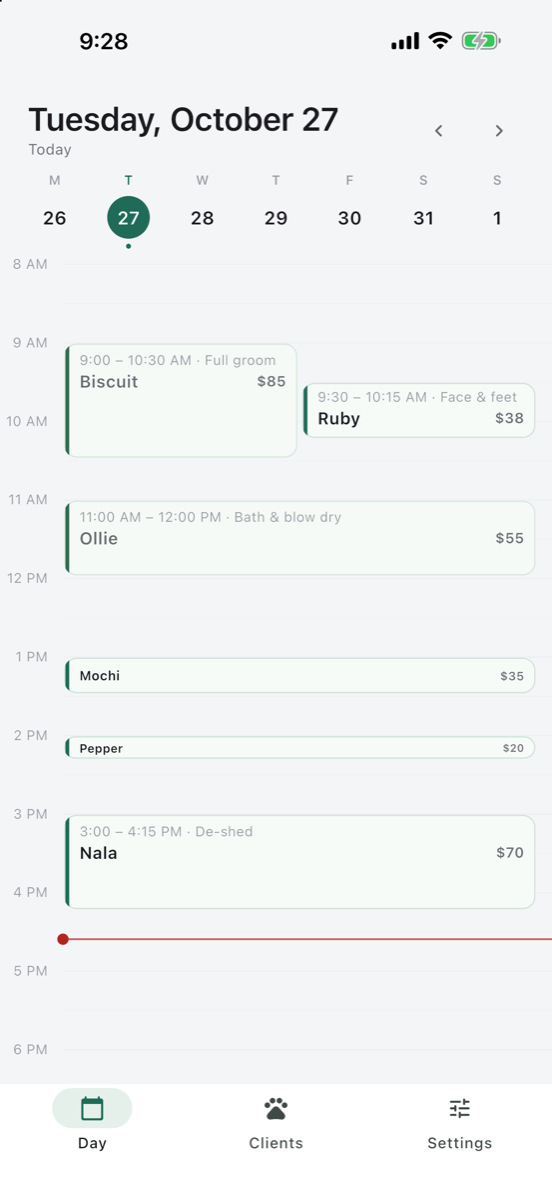
Overlaps split into columns
Two dogs at once — bath and a full groom — sit side by side instead of hiding each other.
Done or no-show in one tap
The day's takings stay right without re-adding anything up at closing time.
Breed-aware timing
Pick the breed and the app suggests how long that groom really takes. A Standard Poodle is not a Chihuahua.
Handling notes on the booking
"Bites", "matted", "senior" show up where the groom is — not buried three taps into a profile.
A birthday, and the age that follows
Every dog can carry a birth date. The age is worked out for you, the month it falls gets a marker on the client card, and a birthday is searchable the way you would actually type it — 03-14, 03/14, 0314 or 2022-03-14.
Built to be quiet
No sign-up wall, no onboarding carousel, no notification asking you to come back.
No account
Open the app and start working. There is nothing to register, verify or remember a password for.
Stays on your device
Your client book doesn't leave the iPad. No cloud sync, no analytics, no tracking SDK.
Works with the wifi off
Because salon wifi is bad, and the day doesn't stop when the router does.
New in 1.4: the photos travel with the book
What actually changed in this version, and the reason each one is there.
A new phone takes the photos too
Settings still writes the whole book — clients, bookings, services — into a single file, and from 1.4 that file carries the before-and-after shots as well. Open it on the new phone and the clients come back with their photos: no account, no cloud, and no device backup needed. The restore list says how many photos the file holds and warns you before restoring if some are missing.
Today's booking shows its photos
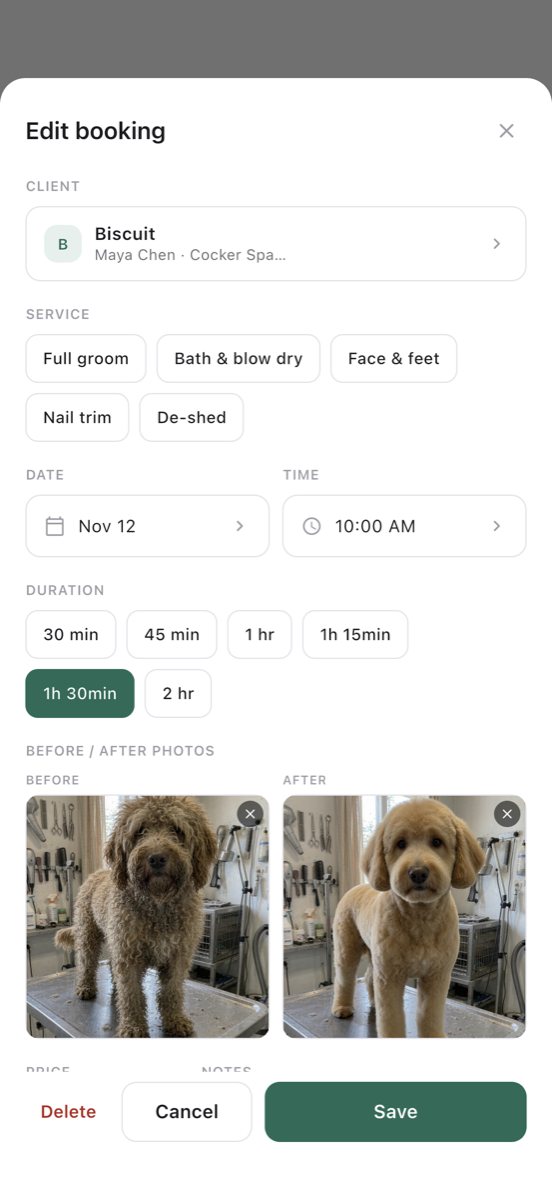
The booking card in the day book has its own photos, so you can pick the before shot or open the pair full screen without leaving the schedule.
One tap on the photo badge
The photo badge on a client's history row opens the whole before-and-after comparison in a single tap — you no longer have to hunt for the appointment it came from.
The photo is the receipt
Owners ask the same question at every pickup: how much did you take off? Two photos taken minutes apart, in the same light and from the same table, answer it without a word — and they settle the call that starts “last time it was shorter”.
Nothing leaves the device. The photos live with the booking in the same file as the rest of the book: delete the appointment and they are deleted with it, and there is no upload step and no photo library to clean out afterwards.
Every dog keeps its own record
- Breed, owner, phone, visits, lifetime spend — the whole book in one place, with the household's other dogs one tap away.
- Vaccine records with due dates, so a booster never gets forgotten between grooms.
- Service price list with durations, so booking is two taps instead of typing a price from memory.
- Due-back dates based on coat cycle, so regulars don't quietly drift away.
- One-tap text reminders — opens your own Messages app with the wording already in it, sent from your number, so there are no SMS credits to buy.
- CSV export whenever your accountant asks for the numbers.
A booster date you can't miss
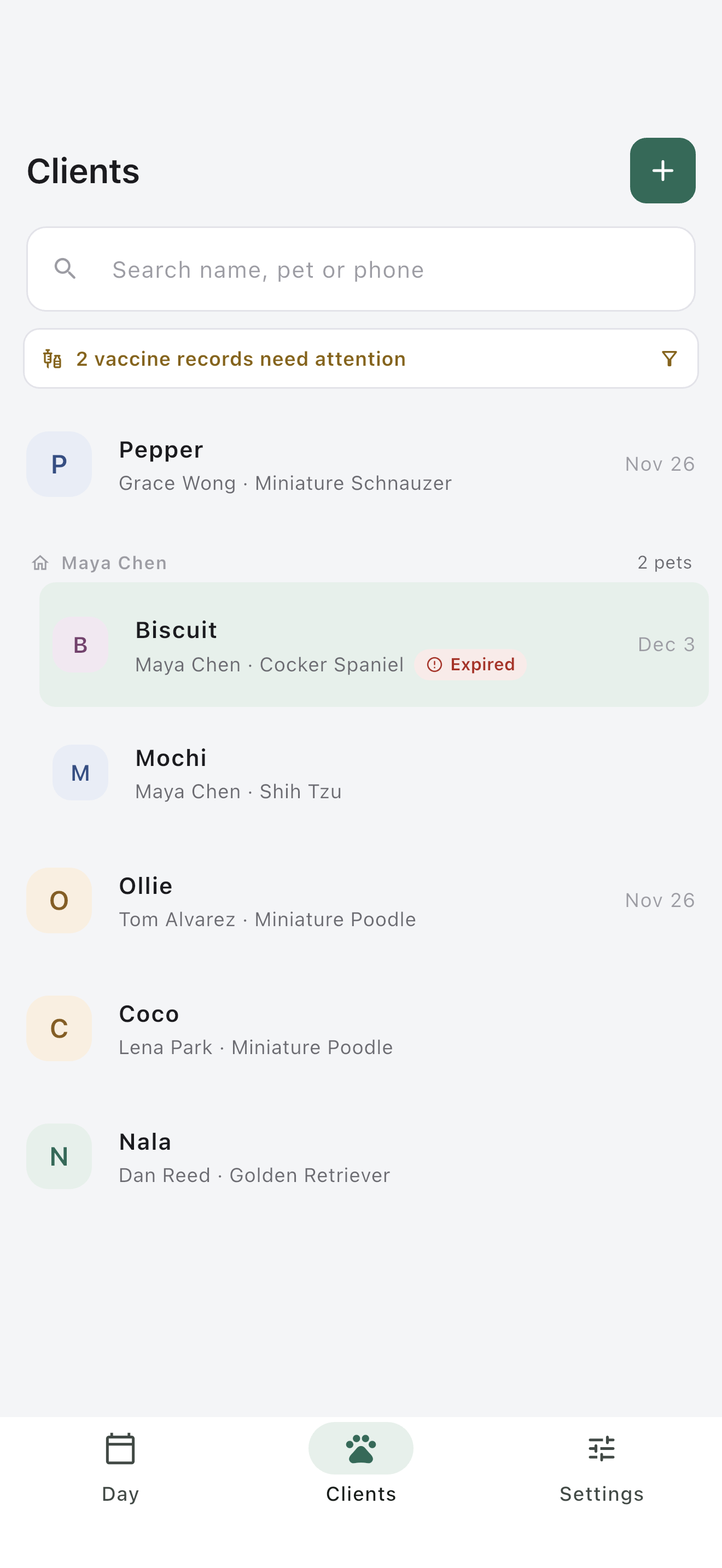
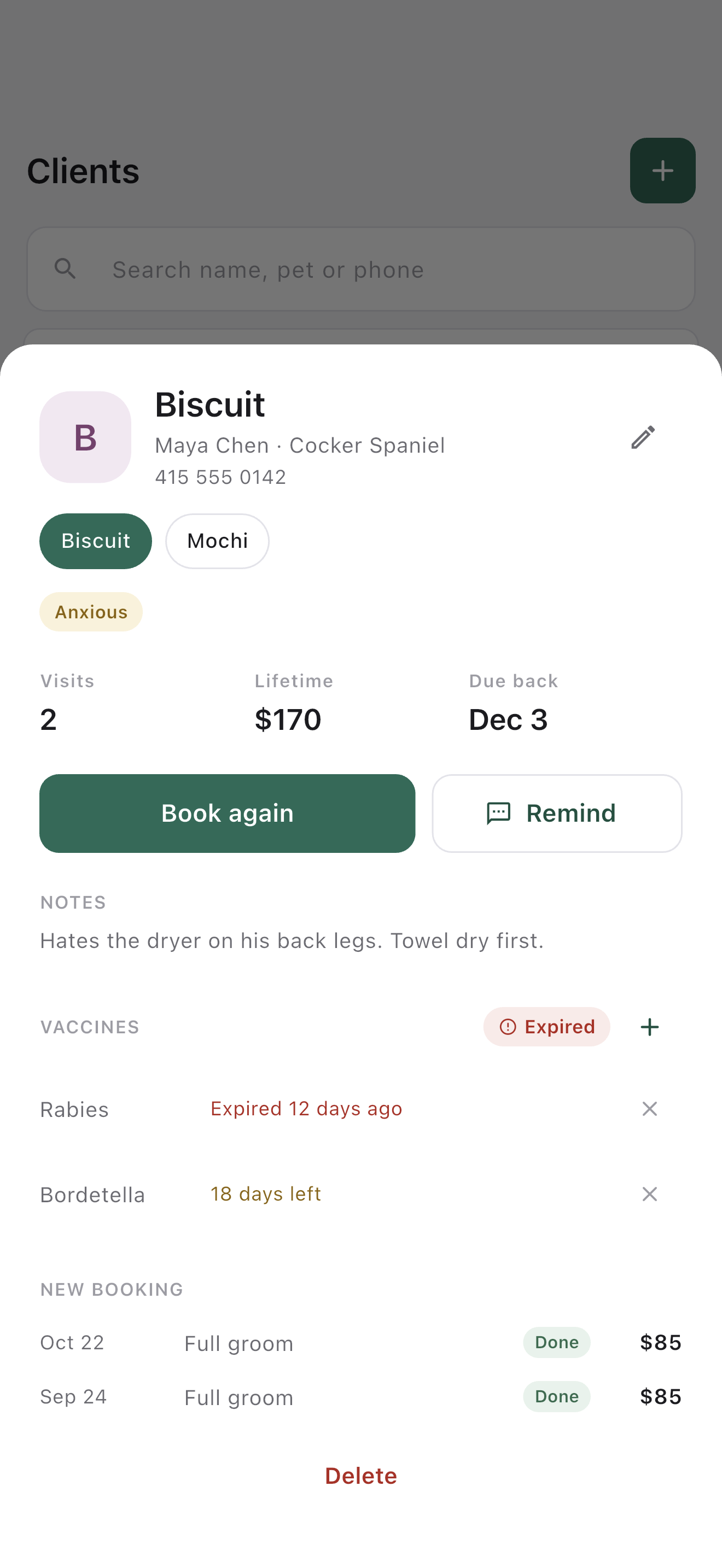
Every pet carries its own vaccine list — rabies, bordetella, DHPP, or a type you name yourself. Each row shows the due date in plain words: 18 days left, or expired 12 days ago in red. The client list raises a banner the moment anything inside 30 days needs a call, so you can text the owner from the same screen instead of finding out at the table.
Free to use. Pay once if you outgrow it.
No subscription, no renewal, no yearly price rise.
Download and work
$0 — no account required
- Whole-day appointment book
- Up to 8 clients
- Service price list and durations
- Done / no-show tracking
For the full book
Single purchase, yours for good
- Unlimited clients
- CSV export of everything
- Weekly revenue reports
- No subscription, ever
Pro is available now inside the app as a single one-time purchase — no subscription, no renewal. Your price is shown in the App Store in your local currency (US$2.99 on the US store). Download free, use the day book, upgrade only if you outgrow the 8-client book.
Questions groomers ask
Is GroomDay free?
Downloading is free and the day book works without paying. The free version holds up to 8 clients, which is enough to run a real week. Pro is a single one-time purchase that removes the client limit and adds CSV export and weekly revenue reports.
Do I need to create an account?
No. There is no sign-up, no login and no email required. Open the app and the current day is already there.
Where is my client data stored?
On your device only. GroomDay has no cloud backend and no analytics, so nothing is uploaded. For a copy of your own, Settings writes the whole book into one backup file you can keep anywhere — and the CSV export is there for the spreadsheet.
Does it work offline?
Yes. The app is fully functional with no connection — it never needs to phone home to show your day.
Does it run on iPhone and iPad?
Yes, the same app runs on both. It's laid out for reading at arm's length on the table, and it works in portrait or landscape.
Is there an Android version?
Not currently. GroomDay is built for iOS and iPadOS only.
I run a multi-chair salon with staff — is this for me?
Probably not. GroomDay is deliberately built for one-person and two-chair studios: no staff scheduling, no marketing tools, no multi-location reporting. That focus is why the day view stays readable.